What This Tutorial Covers
A saved risk profile in MyATMM can be shared as a read-only link. This tutorial takes the SPX iron condor built in the previous tutorial, turns it into a link, opens that link the way a viewer gets it, and then manages it from the Share History page: the view counter, pausing a link and deleting it. Everything happens on a demo account.
It is a demonstration of a tracking tool. Nothing here is investment advice; it shows how a position gets drawn and shared, not what to trade.
Step 1: Open the Share Dialog
The share button sits in the Risk Profile tool toolbar, right next to the profile name. The dialog spells out what goes into the link: a point-in-time snapshot of the profile’s price-locked option sets. A set whose price isn’t locked stays out of the link. The demo condor is locked, so it’s in.
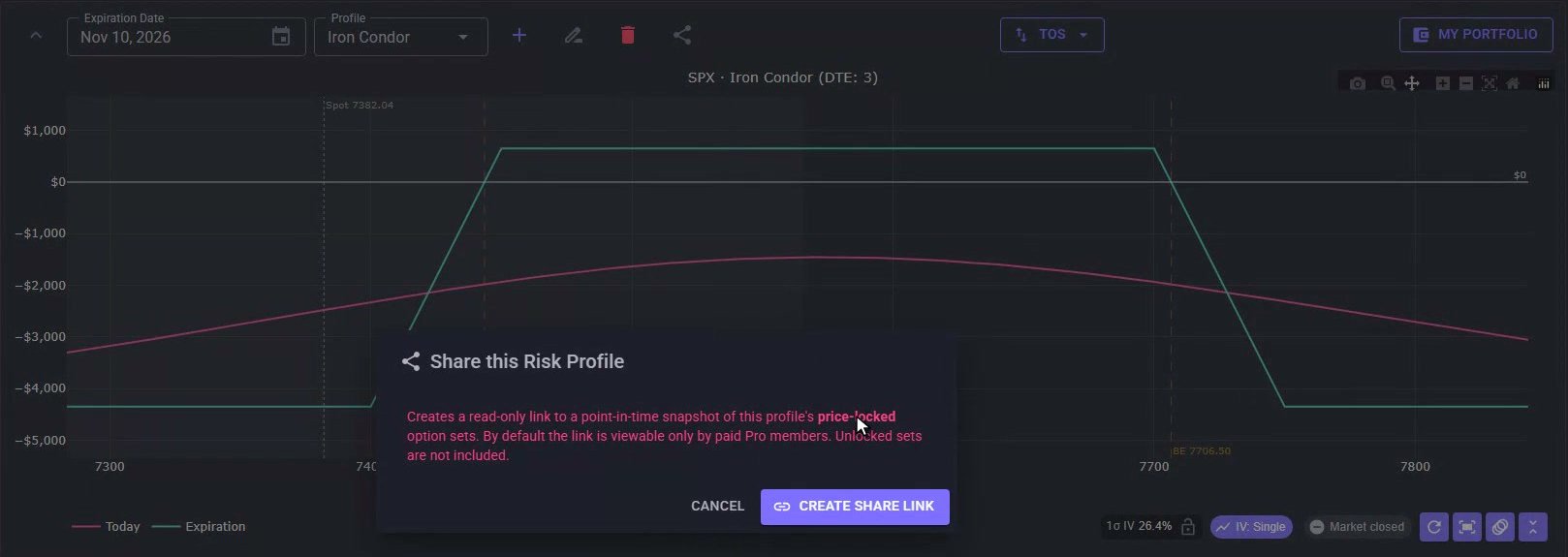
The Share dialog over the saved condor. Only price-locked option sets make it into the snapshot.
Step 2: Create and Copy the Link
Create Share Link makes the link right away. It is a long random address, and the copy icon puts it on the clipboard, ready to paste into a message or a post. Every link you create also lands on the Share History page, so Done just closes the dialog.
Step 3: Find It on Share History
Share History lives in the main menu under Tools. Each row is one link: the profile name, the underlying, the expiration, the date it was created and a view counter, which starts at zero. The Enabled switch turns the link on and off, and the icons on the right copy the link, open it or delete it.

One row per link: name, underlying, expiration, created date, views, the Enabled switch and the actions.
Step 4: See What a Viewer Sees
The open icon shows the link the way anyone you send it to gets it: a stripped-down page with no menus. The header carries the profile name, SPX, the expiration with its days to go, and the settlement.
The chart draws only the expiration line, the payoff at expiry, with both breakevens and the spot price from the moment the link was made. There is no live Today line, because the snapshot doesn’t move with the market. If the chart itself is new to you, reading a put credit spread risk graph walks through the same lines on a simpler position.
Across the top, the numbers come straight from the locked condor:
- Max risk — $4,350.
- Net credit — $650.
- P/L range at expiration — from −$4,350 up to +$650.
- Estimated costs — commissions and fees.
Below the chart the option sets are read-only. The checkbox next to a set adds it to or removes it from the expiration line, and the download button gives the viewer a TOS import file. The footer repeats that the page is a snapshot for tracking only.
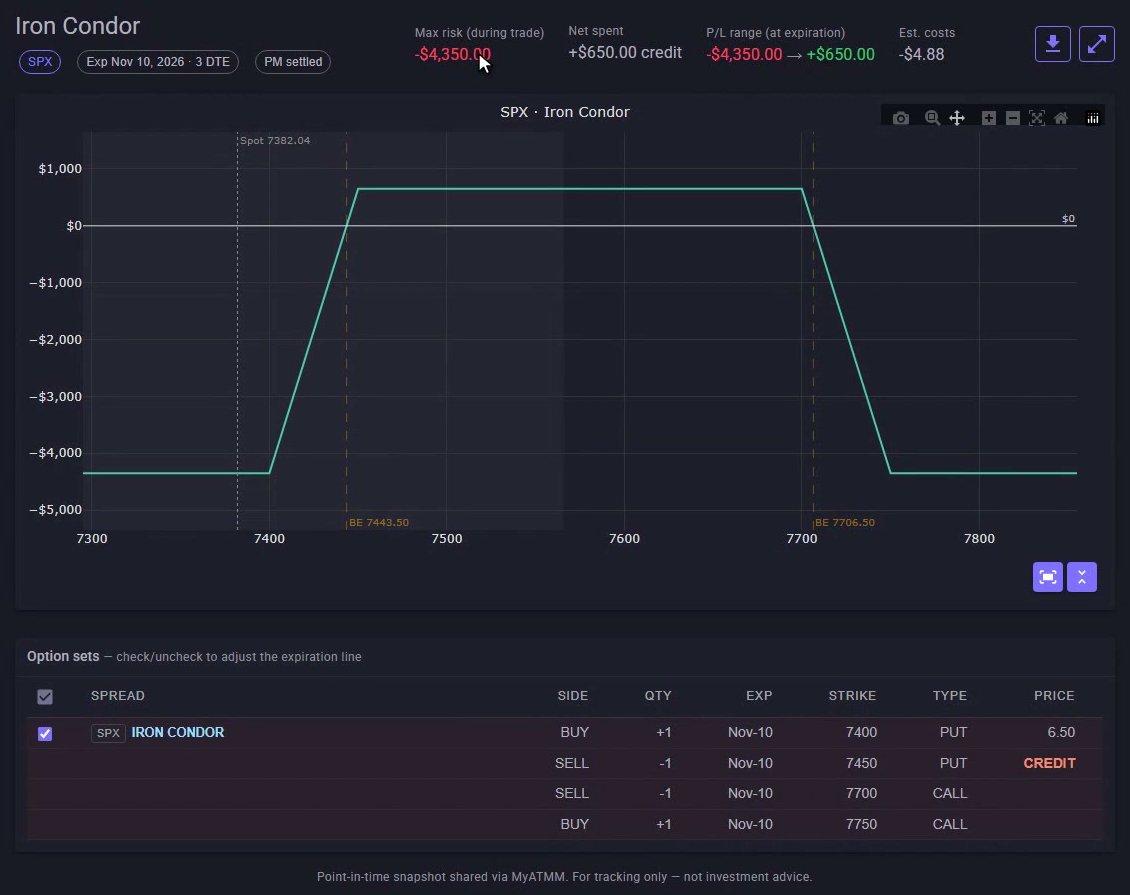
The viewer’s page: the expiration line only, the numbers from the locked condor and the read-only option sets.
Step 5: Track Views and Pause a Link
Back on Share History, the view counter reads one: that visit was counted. Flip the Enabled switch off and the link is paused, not deleted. The address and the snapshot are kept, but the page stops showing the position. Anyone who opens it while it is off sees “Sharing is turned off” and a note to check back later, with nothing about the position. Turn the switch back on and the same link works again: same address, same snapshot.
Step 6: Delete a Link
When a link has done its job, the trash icon deletes it. The confirmation says the link will stop working and the row will leave the history, and that can’t be undone. Confirm, and Share History is empty again.
That is sharing in MyATMM: lock the sets, create the link, and keep track of it in Share History.
Risk Disclaimer
Options trading involves risk and is not suitable for all investors. Past performance does not guarantee future results. This content is for educational purposes only and should not be considered financial advice. The positions shown are demo data. Always consult with a qualified financial advisor before making investment decisions.
Related Reading
- How to build and read an SPX iron condor risk graph — the profile shared in this tutorial, built from scratch
- Risk Profile tool: SPX put credit spread walkthrough
- How to read a put credit spread risk graph: breakeven, max loss and today vs expiration
- How to track SPX and XSP option P&L by expiration — where a saved profile’s max risk and ROI show up
- The best iron condor tracker apps for 2026
Start Tracking Your Options Positions Accurately
MyATMM provides purpose-built cost basis tracking for option sellers, with the flexibility to track covered calls, cash-secured puts, and wheel strategy positions.
Track up to 3 tickers completely free forever. No credit card required.
Create Your Free Account TodayBuilt for covered calls, cash-secured puts, and the wheel strategy