What This Tutorial Covers
This tutorial walks the three tabs on the MyATMM dashboard that track the cash side of an options selling account: Deposits / Withdrawals, Projections, and Performance. It picks up where the cost basis tracking tour for cash-secured put sellers left off, on the same demo account.
It is a demonstration of a tracking tool. Nothing here is investment advice; the video shows how an account gets tracked, not what to trade.
Step 1: The Deposits / Withdrawals Ledger
The Deposits / Withdrawals tab is the cash ledger. Each entry has a date, a note and an amount: a positive number is a deposit, a negative number is a withdrawal, and Save adds it to the list. The table holds every entry, with an edit and a delete icon on each row. The demo account has one opening deposit.
The total of this ledger is the Deposits figure on the Summary tab, and it is the base that every percentage in the next two tabs is measured against.
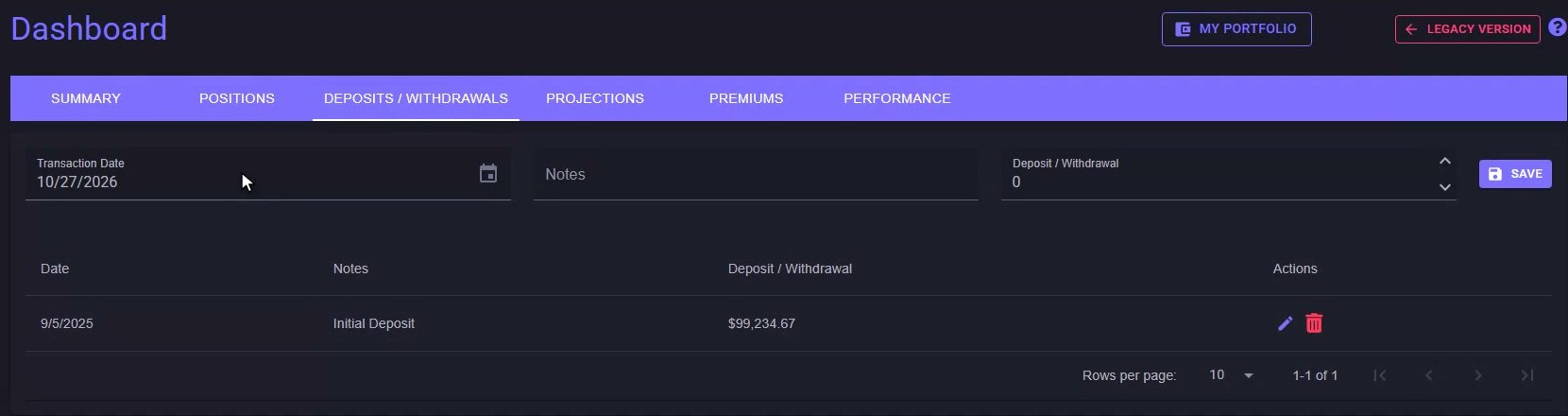
The Deposits / Withdrawals ledger: the base every percentage on the dashboard is measured against.
Step 2: Projections, ROI and Annualized ROI
Projections starts from that same ledger. The left column is the account as it stands: deposits, the collateral tied up behind open puts, stock purchased, and net profit or loss. ROI divides the net premium collected by the deposits. Annualized ROI scales that to a full year using the days since the account's first transaction, so a young account's figure keeps moving as the days add up. The original Projections tab walkthrough goes through the same column on the earlier layout.
Step 3: The What-If Target Calculator
The right column is a what-if calculator. Type in a target annual figure and the tool works the rest out from the account's own numbers to date: the balance that rate would need to reach the target, the days until it gets there at the current pace, the calendar date that lands on, the average weekly pay at the current rate, and the time until, in years, months and days. Change the target and the column recalculates. It is straight-line arithmetic on the account's history, not a forecast.
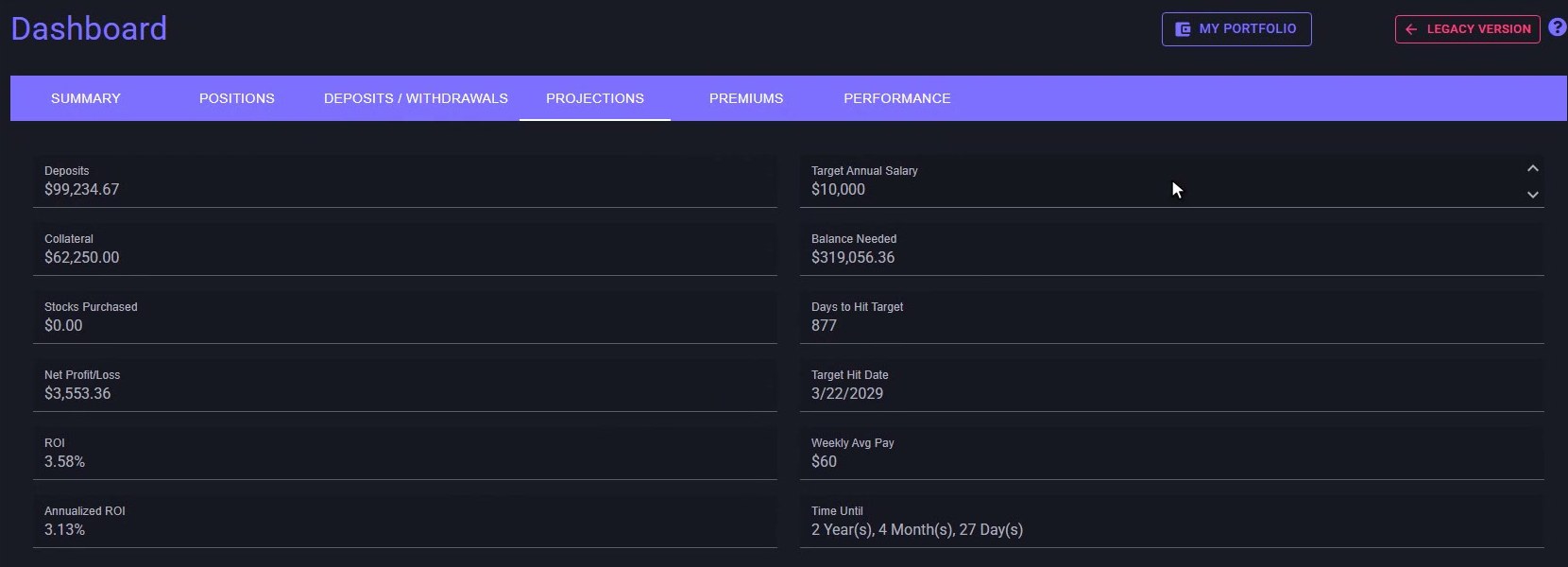
Projections: the account as it stands on the left, the what-if target calculator on the right.
Step 4: Performance by Month
The Performance tab measures the account period by period. Year and Month pick the view, and the boxes across the top total the option premiums, dividends and overall gain or loss for that selection, with the average performance per period and an annualized figure beside them. Each row is one month: deposits, withdrawals, option premiums, dividends, realized gains or losses, then net working capital and how much it changed from the month before.
Step 5: Performance Percent and the Realized Gains Toggle
Performance percent is the period's option premiums divided by the average working capital in play during that period. The checkbox in the Realized Gains column adds realized gains and losses into that percentage when it is on, and leaves them out when it is off. Annualized Return takes the period figure and multiplies it out to a year: twelve for months, fifty-two for weeks.
Step 6: All Weeks and All Time
For a weekly options seller, the Month selector has an All Weeks view. Each row becomes one week, labelled with its week number and date, and the boxes at the top switch to the average weekly performance with the annualized figure beside it. Same columns, same arithmetic, one week at a time. The original Performance tab walkthrough covers the weekly view in more depth.
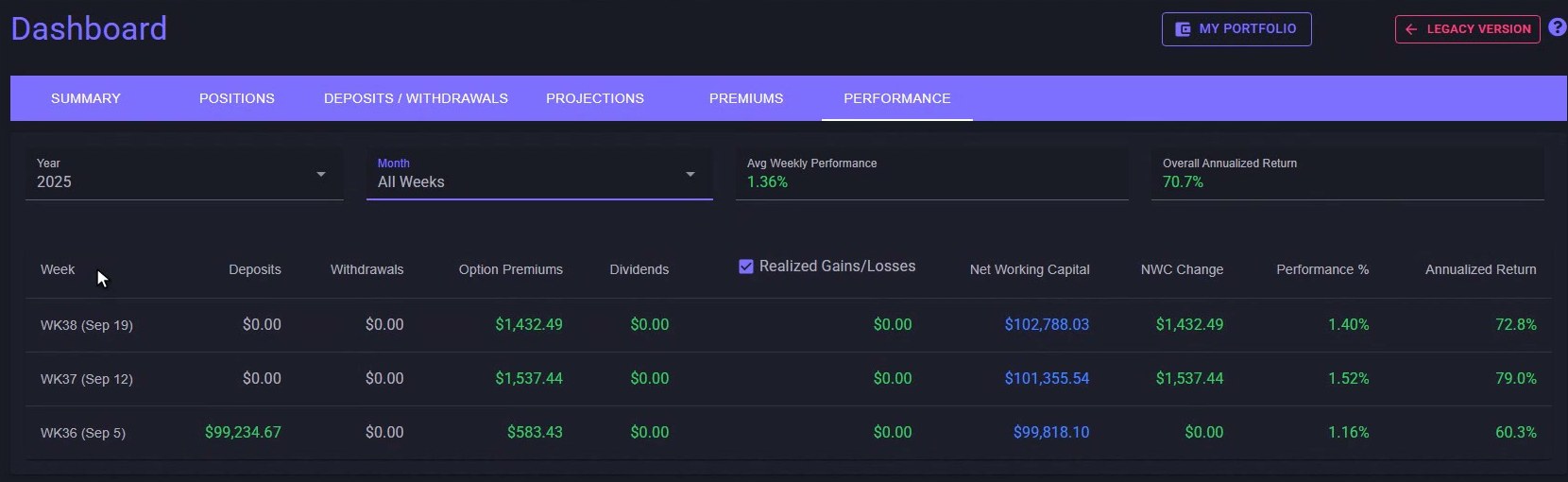
Performance on All Weeks: one row per week, same columns, same arithmetic.
Set Year to All Time and the table rolls up by year instead: deposits, withdrawals and premiums for the year, the year-end net working capital, the change from the year before, and the annual return percent for every year the account has been running.
The Cash Side of the Dashboard
That is the cash side of the MyATMM dashboard: a ledger of deposits and withdrawals, projections built from the account's own rate to date, and a performance table by month, week or year. It is a record of what the account has done, and every number updates as transactions get added. If it is the premiums themselves you want to see by month and type, the Premiums tab sits between Projections and Performance.
Risk Disclaimer
Options trading involves risk and is not suitable for all investors. Past performance does not guarantee future results. This content is for educational purposes only and should not be considered financial advice. The figures shown are demo data. Always consult with a qualified financial advisor before making investment decisions.
Related Reading
- Dashboard Deposits & Withdrawals and Premiums tab on MyATMM — the original walkthrough of the ledger
- Dashboard Projections tab: ROI tracking and income goals
- Dashboard Performance tab: track your weekly ROI and options income
- Cost basis tracking for cash-secured put sellers: the two-minute MyATMM tour
- The best options portfolio tracker for sellers
Start Tracking Your Options Positions Accurately
MyATMM provides purpose-built cost basis tracking for option sellers, with the flexibility to track covered calls, cash-secured puts, and wheel strategy positions.
Track up to 3 tickers completely free forever. No credit card required.
Create Your Free Account TodayBuilt for covered calls, cash-secured puts, and the wheel strategy