What This Tutorial Covers
This tutorial walks the Reconciliation page in MyATMM, found under Tools. It runs three checks on the cost basis records in a portfolio: stock sold with no matching purchase, stock positions that have drifted from their transactions, and LEAP options tracked as stock that expired without a closing entry. Each tab shows a count of what needs attention, and each row has a one-click repair next to a manual route.
It is a demonstration of a tracking tool on a demo account. Nothing here is investment advice; the video shows how records get reconciled, not what to trade.
Step 1: Transaction Errors
The first check totals shares bought and shares sold for each symbol, and flags any symbol where more were sold than bought. The demo account bought one hundred shares of Intel and sold two hundred, so one hundred shares have no purchase record. That usually means a buy never made it in, which is easy to do when a position predates a CSV import or was entered by hand.
Fix builds the missing buy. Edit opens the symbol on the Cost Basis page to correct it by hand. If the shares were bought and sold the same day, the note under the table points to the DAY side, which records entry and exit as one transaction.
Step 2: The Fix Dialog and Add BTO
Fix opens a dialog with the missing purchase filled in. The date is the trading day before the earliest sale. The price is that day's closing price, looked up automatically, with the source shown under the field. The quantity is the shortfall, and the total cost is worked out below. Every field can be changed before anything is saved, so a different real purchase date or price can go in instead.
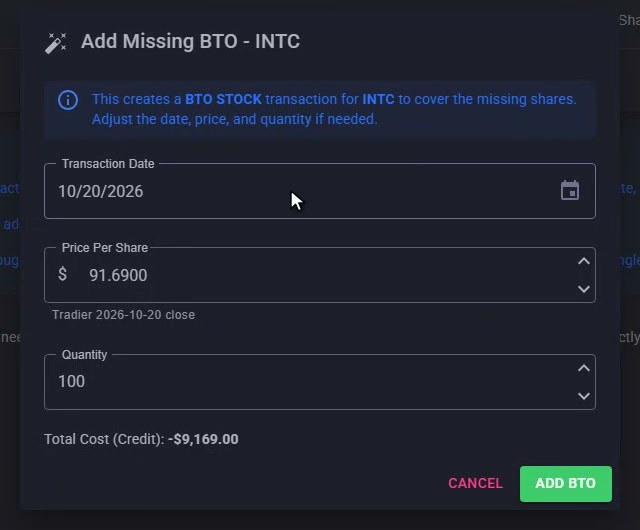
The Fix dialog: date, price and quantity pre-filled, every field editable before Add BTO.
Add BTO saves it as a regular buy transaction on the Intel cost basis, tagged "reconciliation" in its description so it is easy to find later. The check re-runs straight away: the row is gone, the badge on the tab is gone, and the first check reports no transaction errors.
Step 3: Stock Positions
MyATMM keeps a position record for each stock holding, and it also rebuilds the holding first in, first out from the buy and sell transactions. The Stock Positions tab compares the two. For Kenvue the position record says two hundred shares at four thousand dollars, but the transactions say one hundred fifty shares at three thousand, because fifty were sold after the position was recorded. Discrepancy is the difference in cost.
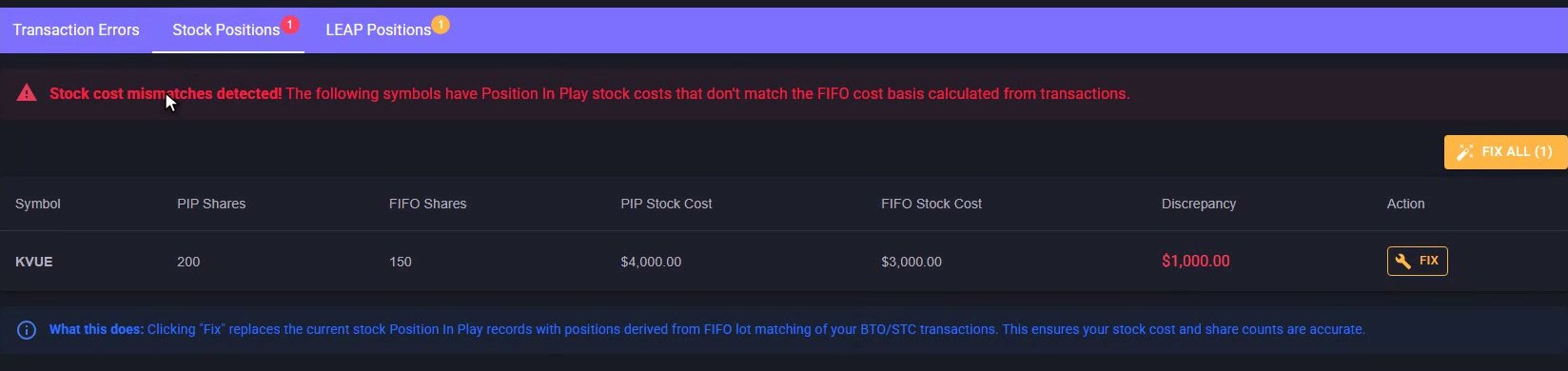
Stock Positions: the position record against the first-in-first-out rebuild from transactions, with the discrepancy in cost.
Fix rebuilds the position from the transactions, and Fix All does every symbol listed. After Fix, the Kenvue position record is replaced by one built from the remaining lots: one hundred fifty shares at the original price. The mismatch clears, and the tab reports that every stock position matches its transactions.
Step 4: LEAP Positions
Some accounts buy a long-dated call and track it as if it were stock, entered as a buy with the Treat As Stock flag. The LEAP Positions tab lists every one of those with no matching closing entry. By default it shows only the expired ones: the demo account's Ford call expired in January and nothing was recorded against it. Show Active adds the ones still running, like a second Ford call that expires next January.
Step 5: Resolve
Resolve closes it out. The dialog shows the original purchase and quantity, a close date, and a proceeds box. For a LEAP that expired worthless the proceeds stay at zero and the realized loss is the full purchase amount. If it was sold before expiration, the sale amount goes in and the figure updates.
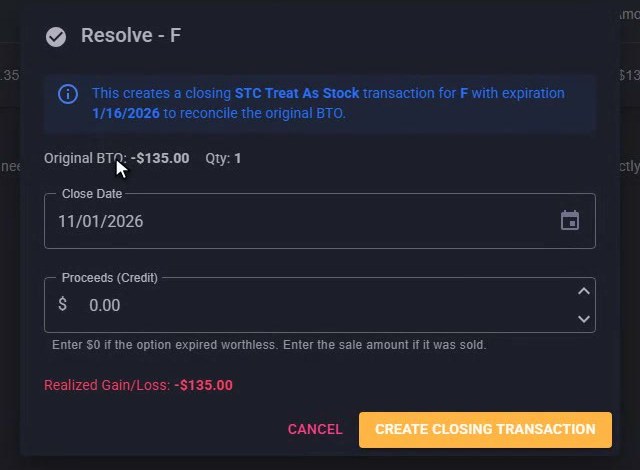
Resolve: the original purchase, a close date and a proceeds box, with the realized figure updating as you type.
Create Closing Transaction writes the matching sell with the same expiration date, which is how MyATMM pairs the two. The row clears, and the tab reports nothing left to reconcile.
Three Checks, One Set of Records That Agree
That is the Reconciliation page: three checks on the records behind a portfolio, each with a one-click repair and a manual route when the suggestion isn't right. Refresh re-runs all three, and the portfolio selector runs them against another portfolio. When every tab is clear, the dashboard and cost basis figures rest on records that agree with each other, which is the point of tracking covered calls and cash-secured puts in one place instead of a spreadsheet.
Risk Disclaimer
Options trading involves risk and is not suitable for all investors. Past performance does not guarantee future results. This content is for educational purposes only and should not be considered financial advice. The figures shown are demo data. Always consult with a qualified financial advisor before making investment decisions.
Related Reading
- Cost basis tracking for cash-secured put sellers: the two-minute MyATMM tour
- Tracking your cost basis with MyATMM: the complete guide
- ThinkorSwim SPX & XSP CSV import and the Import History drill-down
- How to import options trades with AI from any broker
- The best options portfolio tracker for sellers
Start Tracking Your Options Positions Accurately
MyATMM provides purpose-built cost basis tracking for option sellers, with the flexibility to track covered calls, cash-secured puts, and wheel strategy positions.
Track up to 3 tickers completely free forever. No credit card required.
Create Your Free Account TodayBuilt for covered calls, cash-secured puts, and the wheel strategy