What This Tutorial Covers
This four-minute tutorial builds an SPX call credit spread from scratch in the MyATMM Risk Profile tool, then reads what the chart says about it. Everything happens on a demo account: the New Risk Profile dialog, the inline legs editor, the linked-strike and reverse controls, the net credit and max risk chips, the expiration and today lines, breakeven, and the way the saved profile feeds max risk and ROI on the Strategy Summary page.
It is a demonstration of a tracking tool. Nothing here is investment advice; the video shows how a position gets drawn and tracked, not what to trade. The companion tour, reading a put credit spread risk graph, starts from a profile that already exists. This one starts from a blank page.
Step 1: Create the Profile
Every risk profile is pinned to one expiration date. The plus button opens the New Risk Profile dialog, where SPX Family is the default underlying. Give the profile a name (Call Credit Spread in the demo), pick the target expiration, and the dialog checks whether that date settles in the morning or the afternoon. Create Profile saves it immediately, empty and ready for spreads.
Step 2: Open the Legs Editor
A new profile starts with no positions, so Add First Spread opens an inline editor pre-filled with a placeholder: a two-leg SPX call vertical at the money. Each leg has a side, a quantity, the expiration, a strike and a type. The price field tracks live quotes while the structure is being edited, so the number you see moves as you change the legs.

The inline legs editor: a placeholder call vertical with linked strikes and a live price field.
Step 3: Set the Strikes
The strikes are linked by default. Typing 7800 into the first leg rolls both legs up together and keeps the five-point width. Click the chain icon to unlink them, and the second leg can be moved to 7850 on its own, making a fifty-point-wide spread. The price refreshes from live quotes with every change.
Step 4: Reverse It, Lock It, Enter the Credit
At this point the placeholder is a debit spread: buy 7800, sell 7850. The reverse button flips every leg, so the account sells the 7800 call and buys the 7850 call, and the tag changes from debit to credit. The lock freezes the price for manual entry. In the demo the credit received is 14.00 per spread, which is $1,400 on one contract. The check mark saves the spread.
Step 5: Read the Chips
The chips above the Positions table total up the checked spreads:
- Net credit — the cash received, $1,400.
- Max risk — the most the position can lose, $3,600.
- Costs — the estimated commissions and fees.
- Current P/L — where the spread stands right now against its entry price, updated from live quotes.
Step 6: Read the Expiration Line and Breakeven
The chart turns the legs into a picture. Left to right is the SPX price at expiration; up and down is profit or loss in dollars. The green expiration line is the payoff if the spread is held to the end: flat at the full credit below 7800, a straight slope between the strikes, and flat at the max loss above 7850. The marker labeled BE is the breakeven: the short strike plus the credit, 7814.
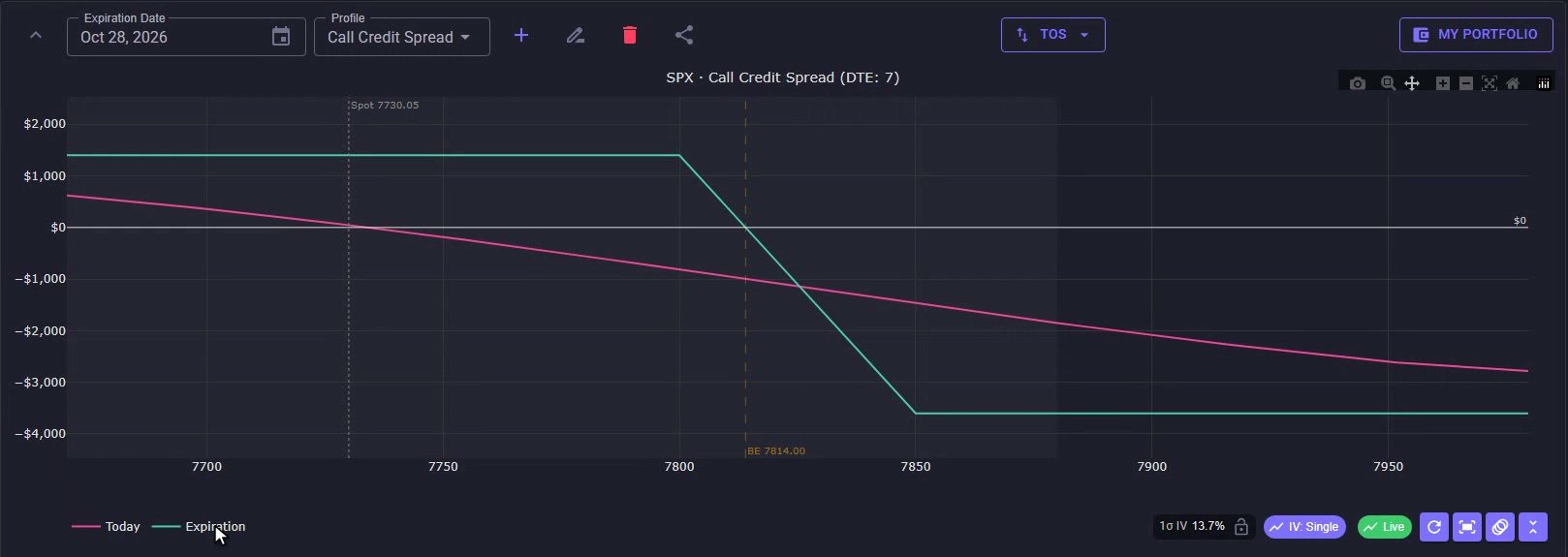
The chart: green expiration line, pink today line, breakeven at 7814 and the dotted spot line.
Step 7: The Today Line, Spot and the One-Sigma Band
The pink line is today: where the spread would stand if SPX moved to that price right now, with time value still in the options, which is why it curves instead of kinking. The dotted spot line is the current index price. The shaded band is one standard deviation, the move the options market is pricing in through expiration, driven by the implied volatility shown in the IV chip. The Live chip means quotes are streaming, so the pink line and the P/L column update on their own.
Step 8: See It on Strategy Summary
Saving the profile also feeds the Strategy Summary page under Tools. The Upcoming Expirations tab lists open positions by expiration date, and the row for this expiration has picked up the profile: Max Risk shows $3,600 with a check mark, and ROI divides the credit booked so far by that max risk. The icon in the Risk Profile column jumps straight back to the saved profile, which is where that max risk number comes from.
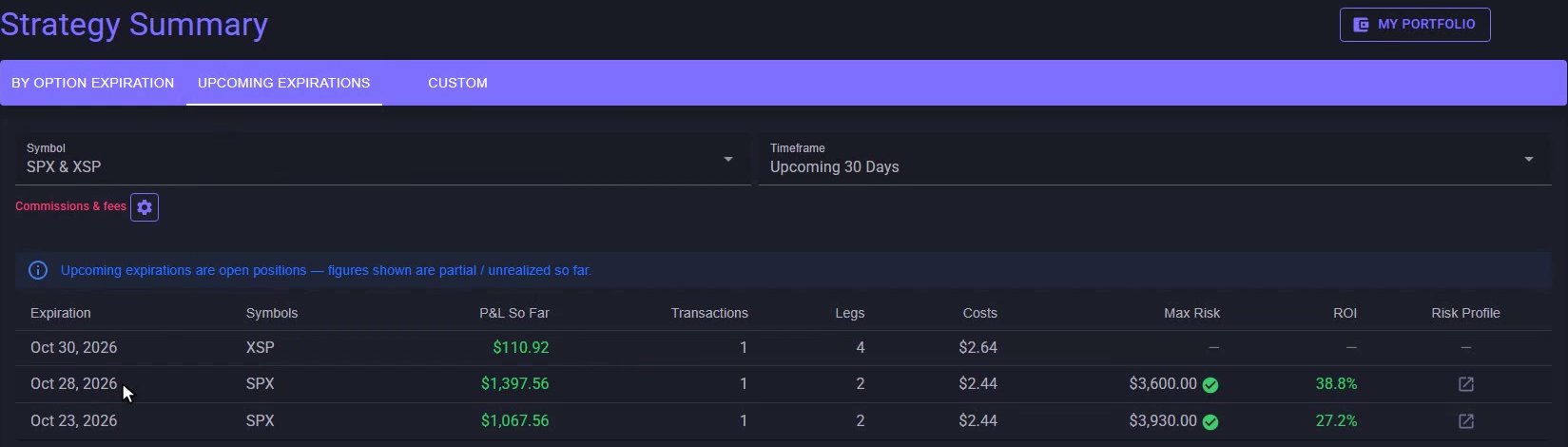
Strategy Summary, Upcoming Expirations: the row has picked up the profile's $3,600 max risk and its ROI.
From Entry to Expiration
Transactions entered on the cost basis side feed the summary, the profile supplies the risk, and the two stay linked by expiration date. That is a call credit spread in MyATMM: build it, lock the price, read the chart, and track it from entry to expiration. If you are comparing tools for this kind of position, see the best credit spread tracker for options sellers in 2026.
Risk Disclaimer
Options trading involves risk and is not suitable for all investors. Past performance does not guarantee future results. This content is for educational purposes only and should not be considered financial advice. The positions shown are demo data. Always consult with a qualified financial advisor before making investment decisions.
Related Reading
- How to read a put credit spread risk graph: breakeven, max loss and today vs expiration — the companion tour, same chart from a saved profile
- How to track SPX and XSP option P&L by expiration — where this profile's max risk and ROI show up
- Risk Profile tool: SPX put credit spread walkthrough
- The best credit spread tracker for options sellers in 2026
- The best iron condor tracker apps for 2026
Start Tracking Your Options Positions Accurately
MyATMM provides purpose-built cost basis tracking for option sellers, with the flexibility to track covered calls, cash-secured puts, and wheel strategy positions.
Track up to 3 tickers completely free forever. No credit card required.
Create Your Free Account TodayBuilt for covered calls, cash-secured puts, and the wheel strategy