What This Tutorial Covers
This tutorial walks the two pages where screening starts in MyATMM: the Tickers page, which holds the list of symbols an account tracks, and the Covered Calls / Cash-Secured Puts screener, which adds option data for the two upcoming weekly expirations to that same list. Everything is shown on a demo account with ten tracked symbols.
It is a demonstration of a tracking tool. Nothing here is investment advice; the video shows how symbols and their option data get tracked, not what to trade. If you are new to the platform, start with how to track covered calls and cash-secured puts and come back here for the screener.
Step 1: Build the Tracked List on the Tickers Page
Every screener in the app starts from the Tickers page. Symbols get typed into the box, space separated, and Add queues them for a data pull. Each row then shows the last price, the annual dividend and yield where there is one, the weekly average, which is the average size of the stock's open-to-close move in a week, and whether the most recent earnings came in positive or negative. The Updated column is the time of the last data refresh.
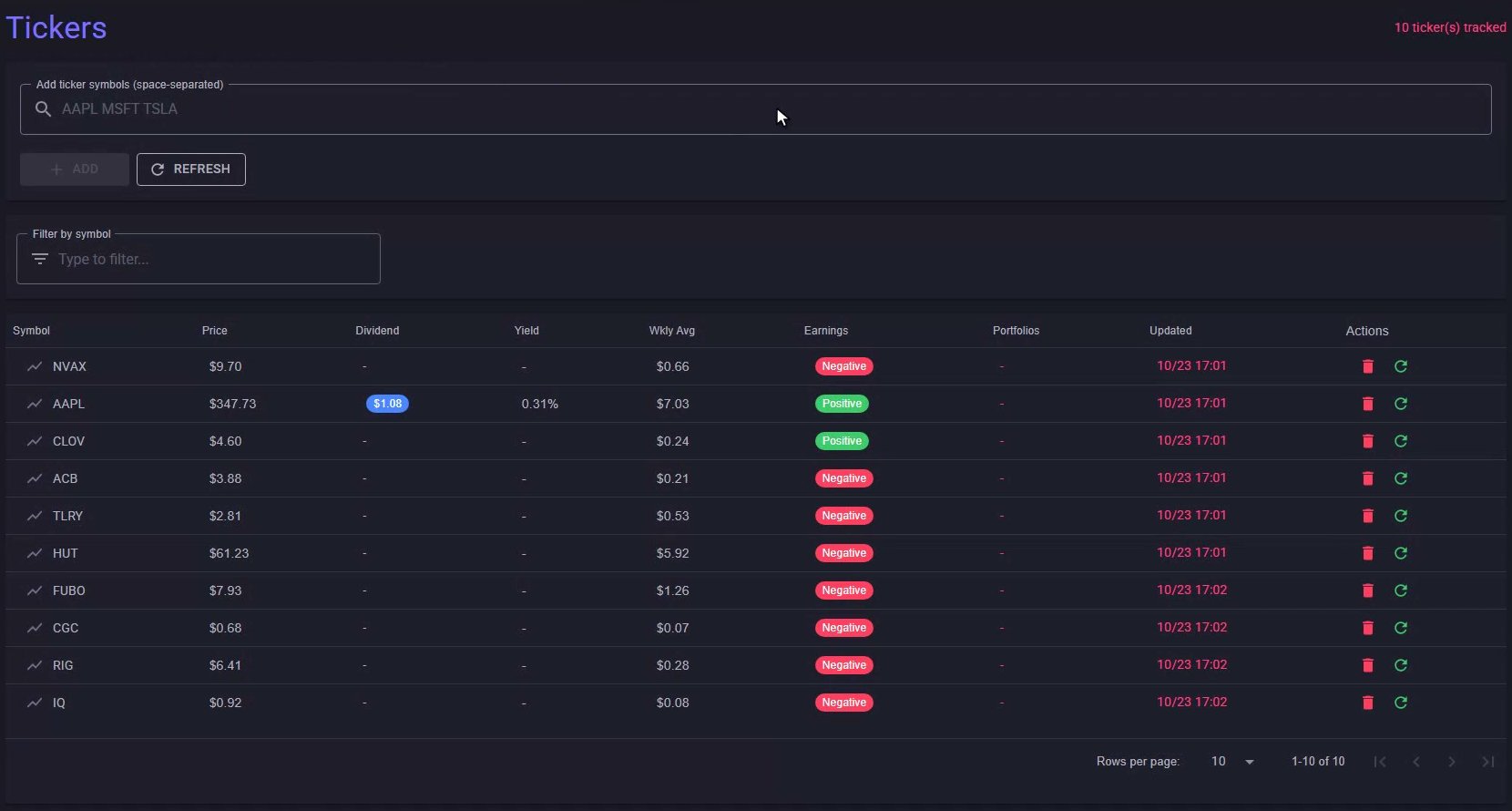
The Tickers page: the tracked list every screener starts from.
Step 2: Open the Screener
Under Screeners in the menu, Covered Calls / CSPs takes the same list and adds option data for the two upcoming weekly expirations. The add box and the refresh button carry over, and the info icon next to them explains every number. Its note is worth reading once: the metrics cover the next two expirations, weekly where the symbol has them, and the data is delayed, not real time.
Step 3: Read the Call and Put Columns
The green columns are the call side. Call Bid is the bid on the first strike above the stock price, Call ROI divides that bid by the stock price, and Call Volume is the number of contracts traded that day. The red columns are the put side: the same three numbers for the first strike below the stock price. ROI above one percent is bolded in green so it stands out when you scan the list.
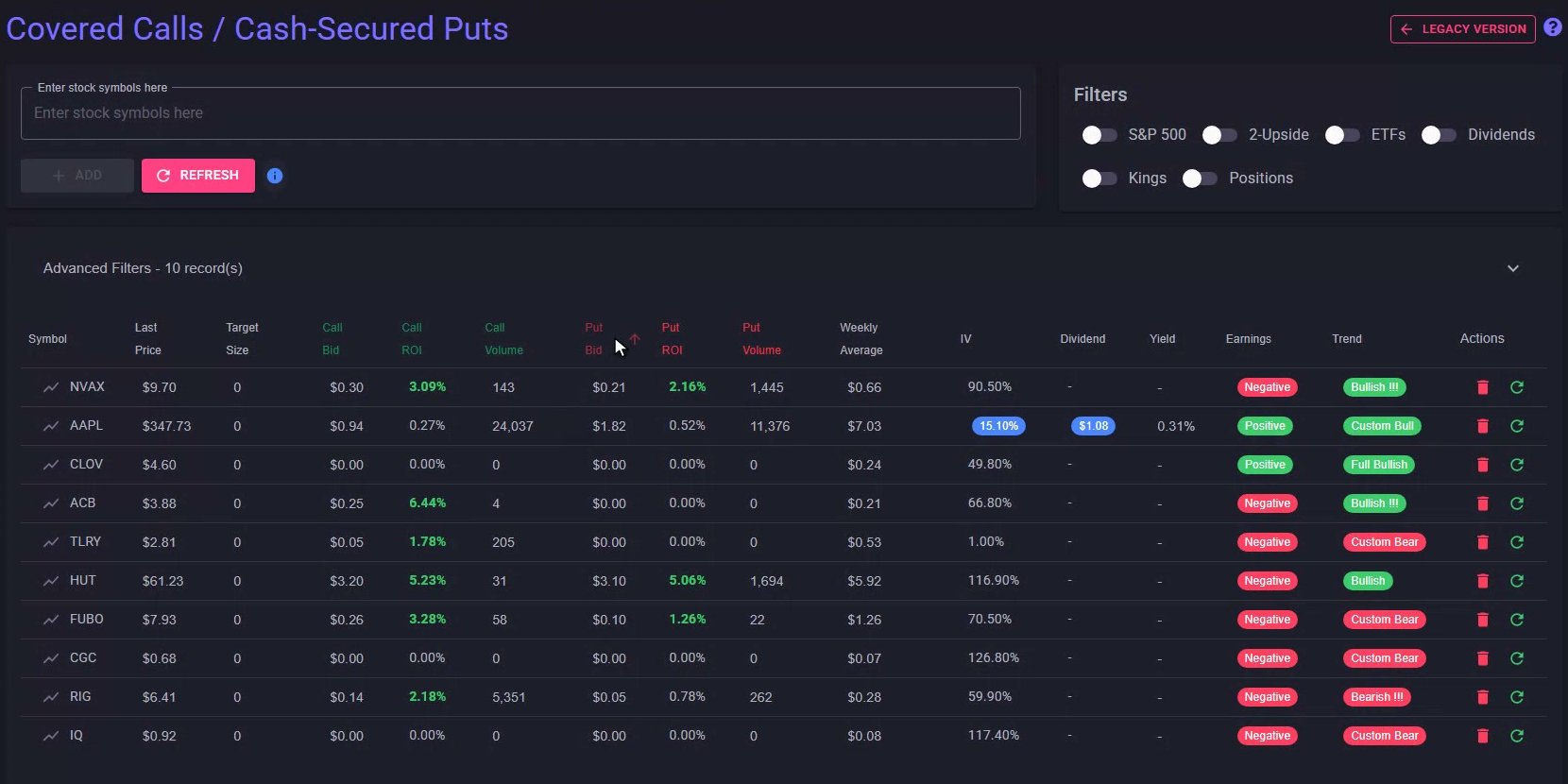
The screener: green call columns, red put columns, and the quick filters on the right.
Step 4: Dividend, Earnings, IV and Trend
Weekly Average carries over from the Tickers page. IV is the implied volatility, with a blue chip marking S&P 500 members. Dividend and Yield repeat the annual dividend and what it works out to at the current price, with a chip for dividend kings, aristocrats, champions and contenders; if dividends matter to the way you track puts, see cash-secured put tracker with dividend tracking. Earnings is the same positive or negative flag. Trend summarizes where the 8, 20, 50 and 200-day moving averages sit relative to each other, from Full Bullish down to Full Bearish, the same stack the Trends page screens on.
Step 5: Narrow the List with Quick Filters
The Filters panel narrows the list with one switch each: S&P 500 members, the 2-Upside price pattern, ETFs, dividend payers, dividend kings, or only the symbols the account already holds. In the demo, flipping on S&P 500 drops the ten symbols to the one member, Apple. Flip it off and the full list is back.
Step 6: Advanced Filters and Display Type
Advanced Filters opens the detail controls. Display Type picks the expiration: Current is the upcoming weekly, Next is the one after it, Volume compares both, and All shows every column side by side. Switching to Next swaps in the following week's bids, ROI and volume. The boxes below filter on symbol, minimum bid, minimum ROI, a price range and minimum volume. For strike-by-strike searches across a whole option chain, the Option Search tool is the next page over.
Step 7: Size a Position with Target Position Cost
Target Position Cost is a sizing helper, not a recommendation. Enter the dollar amount for one position, $10,000 in the demo, and Target Size converts it into whole lots of 100 shares at each stock's last price: a thousand shares of a ten-dollar stock, one hundred of a sixty-dollar stock, and zero where a single lot costs more than the budget.
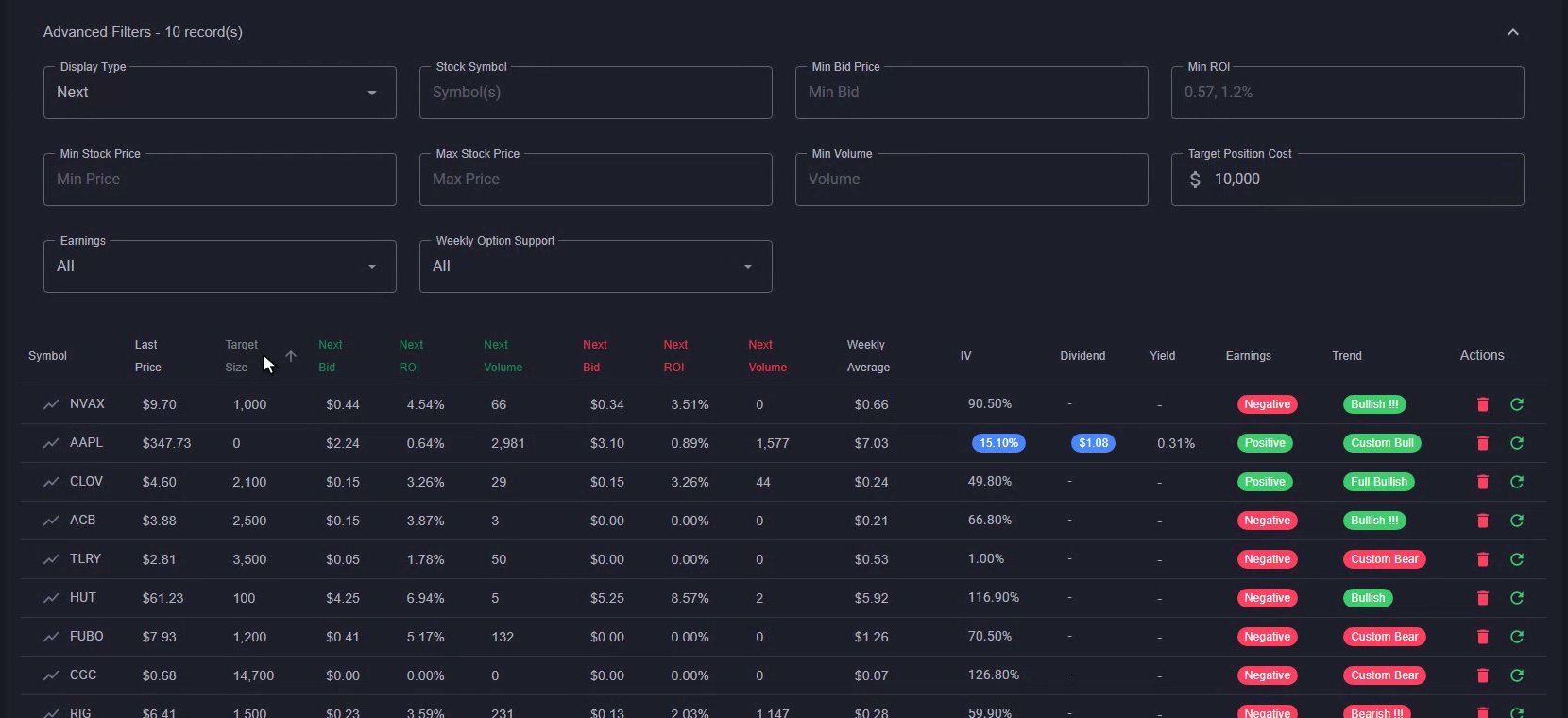
Advanced Filters on Next, Target Position Cost at $10,000, and the Target Size column it fills in.
From Watch List to Screener
That is the Covered Calls / Cash-Secured Puts screener in MyATMM: a watch list on the Tickers page, option bids and ROI for the next two weekly expirations, and filters to cut the list down to what the account wants to follow.
Risk Disclaimer
Options trading involves risk and is not suitable for all investors. Past performance does not guarantee future results. This content is for educational purposes only and should not be considered financial advice. The symbols and quotes shown are demo data. Always consult with a qualified financial advisor before making investment decisions.
Related Reading
- Covered Calls and Cash-Secured Puts analysis page on MyATMM — the original walkthrough of this screener
- Option Search tool: advanced screening for covered calls and cash-secured puts
- Trends search: SMA stock screening with earnings data
- How to track covered calls and cash-secured puts
- The best cash-secured put tracker apps for 2025
Start Tracking Your Options Positions Accurately
MyATMM provides purpose-built cost basis tracking for option sellers, with the flexibility to track covered calls, cash-secured puts, and wheel strategy positions.
Track up to 3 tickers completely free forever. No credit card required.
Create Your Free Account TodayBuilt for covered calls, cash-secured puts, and the wheel strategy